Bad prompts get bad answers. Behtar fixes that before you hit Send.
It nudges you when a prompt is weak — and has a stronger version ready before you send.
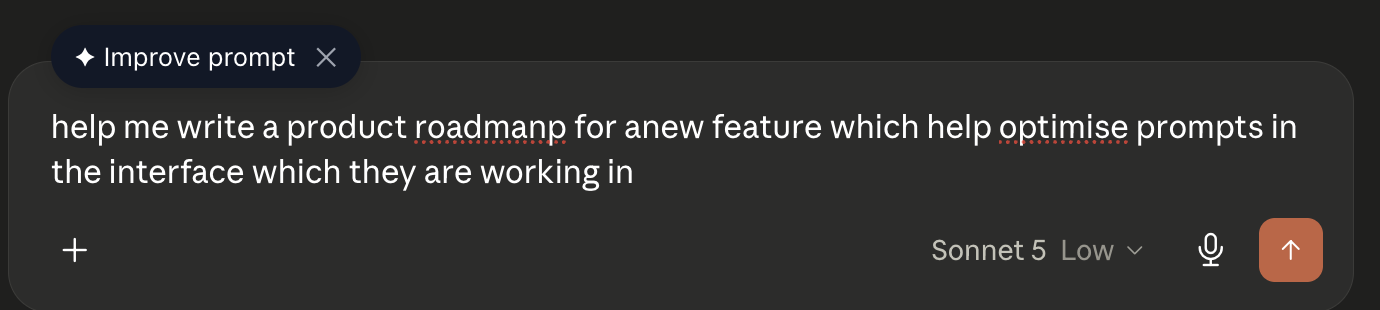
Three steps. Zero extra effort.
You type a prompt
Write your prompt on ChatGPT, Claude, Gemini, or Perplexity — exactly as you normally would.
Behtar scores it locally
Your prompt is evaluated on your device. Nothing leaves your browser just because you typed something.
You get a better version
If the prompt is weak, Behtar surfaces an improved version. Accept it, dismiss it — you're always in control.
Three modes. You choose.
Low friction
A small chip appears near the send button when a better version is available. Click it to see the improvement. Totally optional.
Side by side
See your original prompt and the improved version before deciding. Great for understanding what changed and why.
Set and forget
Behtar silently replaces weak prompts with the improved version. Zero clicks required.
Unique to Behtar
Switch between modes any time from the extension popup.
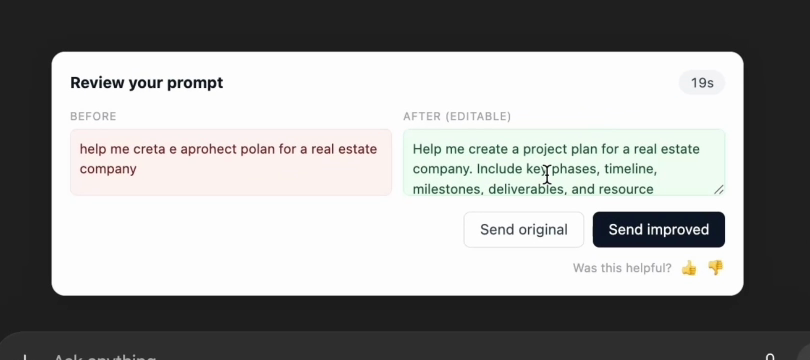
Review mode on ChatGPT: decide before anything is sent.
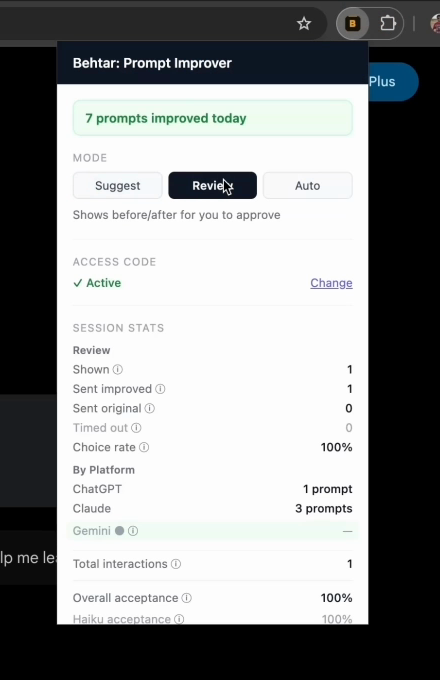
The popup: switch modes and track your improvements per platform.
Works where you already work.
Your prompts are yours.
⬡ Local scoring
Your prompt is scored entirely on your device. Nothing is transmitted just because you typed something.
⬡ Only weak prompts travel
A prompt only leaves your device if it needs improvement — and even then, it is not stored on any server.
⬡ No account to manage
No password, no profile, no dashboard. Just an email so we can track your free usage — never used for marketing.
⬡ No browsing history
Behtar only reads the prompt input field on supported AI sites — nothing else on your browser.
Start free. Upgrade when you need more.
- 20 prompt improvements per month
- All three modes: Suggest, Review, Auto
- Works on ChatGPT, Claude, Gemini & Perplexity
- Up to 3,000 prompt improvements per month
- Fair-use cap of 100 per day
- Cancel anytime — no long-term contract
Start on the Free plan by verifying your email in the extension — no card required, no password to create. Upgrade to Pro anytime from the extension popup, and cancel anytime. See our Cancellation & Refund Policy and Terms of Use.
Better answers start with better prompts.
Install the extension, verify your email, and get 20 free improvements every month.